> ## Documentation Index
> Fetch the complete documentation index at: https://help.coregptapps.com/llms.txt
> Use this file to discover all available pages before exploring further.
# GPT for Google Forms - CoreGPT Apps
> Build smarter forms in less time with AI. Generate questions, tailor response options, and streamline surveys effortlessly. AI Question Generator, Response Analyzer, Report Builder.
## Build Smarter Forms in Less Time
Create engaging surveys and forms faster with AI assistance. ChatGPT for Google Workspace helps you generate questions, analyze responses, and create reports — all in one place.
## Key Features
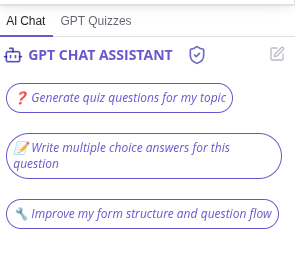
### GPT Chat Assistant
An AI agent that works with your form content. Select any questions or text in your form and ask the assistant to help you with custom requests or use pre-built actions.
**What you can do:**
* Ask custom questions about your form
* Generate survey questions automatically
* Create response options
* Analyze open-ended responses
* Categorize and summarize feedback
* Generate summary reports
* Improve question wording
* Extract key themes and patterns
* Optimize questions for better responses
 ### Form Type Generation
Generate complete forms for different purposes:
* **Customer Feedback Forms** - Collect satisfaction and feedback
* **Employee Surveys** - Gather team feedback and engagement data
* **Product Feedback Forms** - Get user opinions on products
* **Registration Forms** - Collect attendee or user information
* **Quiz & Assessment Forms** - Create educational assessments
* **NPS Surveys** - Measure customer loyalty
* **Market Research Forms** - Conduct market analysis
* **Event Sign-up Forms** - Manage event registrations
### Form Type Generation
Generate complete forms for different purposes:
* **Customer Feedback Forms** - Collect satisfaction and feedback
* **Employee Surveys** - Gather team feedback and engagement data
* **Product Feedback Forms** - Get user opinions on products
* **Registration Forms** - Collect attendee or user information
* **Quiz & Assessment Forms** - Create educational assessments
* **NPS Surveys** - Measure customer loyalty
* **Market Research Forms** - Conduct market analysis
* **Event Sign-up Forms** - Manage event registrations
 ## Common Use Cases
### Customer Feedback
1. Generate feedback questions
2. Create response options
3. Collect responses
4. Analyze feedback automatically
5. Generate insights report
### Employee Surveys
1. Create survey questions
2. Generate response options
3. Distribute survey
4. Analyze responses
5. Share summary report
### Product Feedback
1. Generate product feedback questions
2. Create rating scales
3. Collect feedback
4. Analyze responses
5. Extract improvement ideas
### Registration Forms
1. Generate registration questions
2. Create response options
3. Collect registrations
4. Analyze registrant data
5. Generate attendee reports
### Quizzes & Assessments
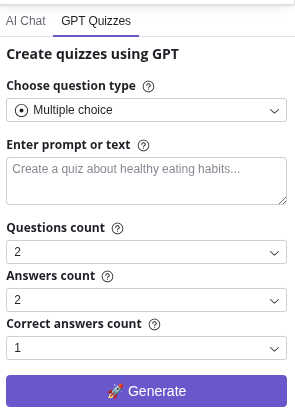
1. Generate quiz questions
2. Create answer options
3. Administer quiz
4. Analyze results
5. Generate score reports
## How to Use
Create a new Google Form or open an existing one.
Click **Extensions** → **ChatGPT for Google Workspace** → **🚀 Launch GPT**
* Click a pre-built action button (Generate Questions, Improve Questions, Analyze Responses, Generate Report)
* Or type a custom question in the chat box (e.g., "Generate survey questions about customer satisfaction" or "Analyze these responses")
The assistant will process your form content and provide results in the chat panel.
Click **Copy** to copy the result, or ask follow-up questions to refine it before copying.
## Tips & Best Practices
Instead of "Generate questions," try "Generate 5 customer satisfaction survey questions about our product quality."
Specify: "Generate multiple choice questions" or "Generate open-ended questions" or "Generate rating scale questions."
Use multiple choice for easy analysis and open-ended for detailed feedback.
Don't wait until the end. Analyze responses as they come in to identify trends early.
## Question Types You Can Generate
* **Multiple Choice** - Easy to analyze, good for quick feedback
* **Checkboxes** - Allow multiple selections
* **Dropdown** - Good for long lists
* **Linear Scale** - Rating scales (1-5, 1-10)
* **Multiple Choice Grid** - Compare multiple items
* **Checkbox Grid** - Multiple selections across items
* **Short Answer** - Quick text responses
* **Paragraph** - Longer text responses
## Troubleshooting
Be more specific about your needs:
* "Generate 5 questions about customer service quality"
* "Create questions for a product satisfaction survey"
* "Generate questions for a post-event feedback form"
Specify what you want:
* "Generate response options: Strongly Agree, Agree, Neutral, Disagree, Strongly Disagree"
* "Create options: Very Satisfied, Satisfied, Neutral, Dissatisfied, Very Dissatisfied"
Make sure you have enough responses:
* Analysis works better with 10+ responses
* More responses = better insights
* Try analyzing again after collecting more responses
## Best Practices for Form Design
**Good form design:**
* ✅ Clear, specific questions
* ✅ Logical flow
* ✅ Mix of question types
* ✅ Reasonable length (5-10 minutes)
* ✅ Optional vs required fields marked
## Privacy & Security
Your forms and responses are safe:
* We never store your form data or responses
* All processing is encrypted
* Your data stays in your Google account
* We don't use your data to train models
## Next Steps
Learn about CoreGPT AI for Outlook, Word, Excel, PowerPoint, OneNote, and Teams.
Find answers to common questions.
## Common Use Cases
### Customer Feedback
1. Generate feedback questions
2. Create response options
3. Collect responses
4. Analyze feedback automatically
5. Generate insights report
### Employee Surveys
1. Create survey questions
2. Generate response options
3. Distribute survey
4. Analyze responses
5. Share summary report
### Product Feedback
1. Generate product feedback questions
2. Create rating scales
3. Collect feedback
4. Analyze responses
5. Extract improvement ideas
### Registration Forms
1. Generate registration questions
2. Create response options
3. Collect registrations
4. Analyze registrant data
5. Generate attendee reports
### Quizzes & Assessments
1. Generate quiz questions
2. Create answer options
3. Administer quiz
4. Analyze results
5. Generate score reports
## How to Use
Create a new Google Form or open an existing one.
Click **Extensions** → **ChatGPT for Google Workspace** → **🚀 Launch GPT**
* Click a pre-built action button (Generate Questions, Improve Questions, Analyze Responses, Generate Report)
* Or type a custom question in the chat box (e.g., "Generate survey questions about customer satisfaction" or "Analyze these responses")
The assistant will process your form content and provide results in the chat panel.
Click **Copy** to copy the result, or ask follow-up questions to refine it before copying.
## Tips & Best Practices
Instead of "Generate questions," try "Generate 5 customer satisfaction survey questions about our product quality."
Specify: "Generate multiple choice questions" or "Generate open-ended questions" or "Generate rating scale questions."
Use multiple choice for easy analysis and open-ended for detailed feedback.
Don't wait until the end. Analyze responses as they come in to identify trends early.
## Question Types You Can Generate
* **Multiple Choice** - Easy to analyze, good for quick feedback
* **Checkboxes** - Allow multiple selections
* **Dropdown** - Good for long lists
* **Linear Scale** - Rating scales (1-5, 1-10)
* **Multiple Choice Grid** - Compare multiple items
* **Checkbox Grid** - Multiple selections across items
* **Short Answer** - Quick text responses
* **Paragraph** - Longer text responses
## Troubleshooting
Be more specific about your needs:
* "Generate 5 questions about customer service quality"
* "Create questions for a product satisfaction survey"
* "Generate questions for a post-event feedback form"
Specify what you want:
* "Generate response options: Strongly Agree, Agree, Neutral, Disagree, Strongly Disagree"
* "Create options: Very Satisfied, Satisfied, Neutral, Dissatisfied, Very Dissatisfied"
Make sure you have enough responses:
* Analysis works better with 10+ responses
* More responses = better insights
* Try analyzing again after collecting more responses
## Best Practices for Form Design
**Good form design:**
* ✅ Clear, specific questions
* ✅ Logical flow
* ✅ Mix of question types
* ✅ Reasonable length (5-10 minutes)
* ✅ Optional vs required fields marked
## Privacy & Security
Your forms and responses are safe:
* We never store your form data or responses
* All processing is encrypted
* Your data stays in your Google account
* We don't use your data to train models
## Next Steps
Learn about CoreGPT AI for Outlook, Word, Excel, PowerPoint, OneNote, and Teams.
Find answers to common questions.